
Easy Homescreen
Homescreen AppsPersonalization
4.026.82K Reviews
- Version
- 1.10.29
- Installs
- 10.00M
- Age Rating
- Everyone
Screenshots
Our Review of Easy Homescreen
 Analysis by Appyee
I like the idea of changing a phone’s home screen without turning a small personal tweak into a technical project. Easy Homescreen is aimed at that sweet spot: making the screen feel more individual while keeping everyday navigation approachable. As a free personalization app from Homescreen Apps, it has a 4.0 average from around 242,000 ratings and over 10 million installs. That reach makes it a familiar option in its corner of Android customization, though popularity alone doesn’t tell you whether its approach will suit your habits.
A practical approach to personalizing your screen
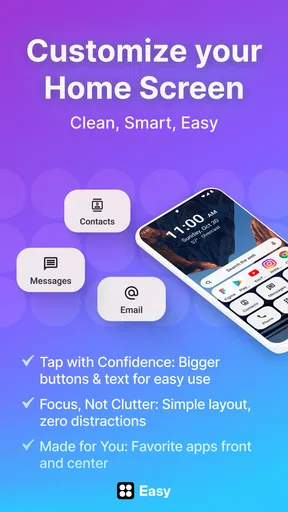
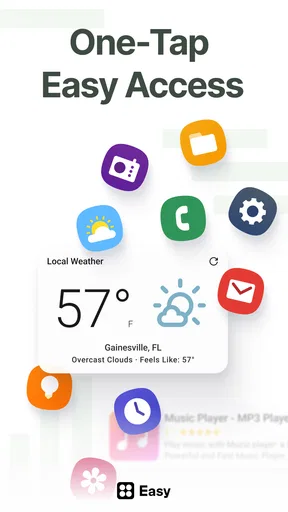
The appeal is in having a place to shape the parts of the phone you see most often. Fonts, shortcuts, and icons are the kinds of details that can make a screen feel more considered without requiring you to rebuild everything from scratch. I’d treat this as a light home-screen makeover rather than a promise of complete control over every part of the device. If your goal is to make common actions easier to spot and give the interface a more personal look, that focus is useful.
A good way to start is to decide what you want the screen to do before choosing its appearance. For example, you might want a simpler first page for the apps you use every morning, or clearer visual cues for the tools you reach for during work. Changing fonts and icons can support that plan, while shortcuts can reduce the steps between unlocking the phone and opening something you use often. The point is not to decorate every available space; it is to make the screen easier for you to read and use.
Where the customization earns its place
The strongest case for Easy Homescreen is convenience. A well-organized home screen can help when you are moving between familiar tasks and don’t want to hunt through a crowded layout. I’d begin with a small change, such as making the most-used apps easier to recognize, then live with it for a few days. That gives you a better sense of whether a visual adjustment actually helps, instead of making several changes at once and then not knowing which one improved the experience.
There is also a useful trade-off between character and clarity. A distinctive font or a coordinated set of icons can make the screen more pleasing, but decoration only helps if labels and app identities remain easy to recognize. I’d favor a consistent look over a collection of individually striking choices. If you often open apps by their position or familiar icon, changing too much at once may slow you down until your muscle memory catches up.
Good habits for a less cluttered home screen
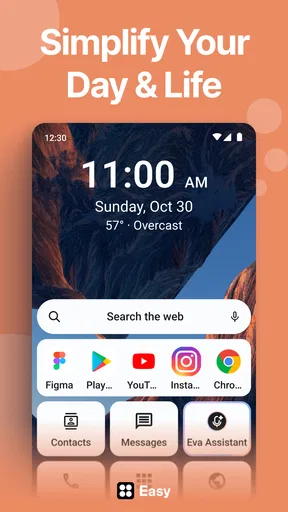
One practical workflow is to separate the screen’s jobs. Keep the first page focused on the apps and shortcuts that matter most during a normal day, and avoid filling it with options you rarely touch. Then use a deliberate visual style so the important items stand out. This approach is especially helpful if you tend to unlock your phone for one quick task and get pulled into unrelated apps along the way.
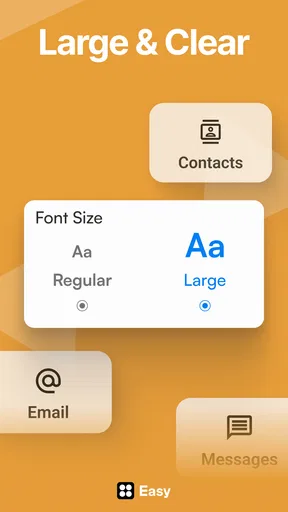
Another useful test is to make one change, use the phone as usual, and notice whether it saves effort or simply looks different. If an icon treatment makes two apps harder to tell apart, undoing that choice is sensible; a home screen should serve you, not make you memorize a new visual puzzle. The same restraint applies to fonts: readability matters more than novelty, particularly when you glance at the screen in bright daylight or while distracted.
Customization Galore
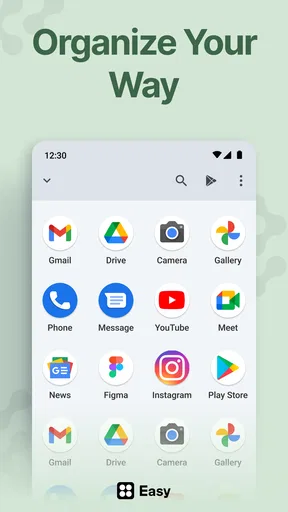
One of the first things I noticed with Easy Homescreen is the sheer amount of customization options it offers. Seriously, you can tweak almost anything. From changing the layout, adjusting icon sizes, to picking themes that match your mood, it’s like having a mini interior designer at your fingertips. And the best part? You don’t need to be a tech wizard to make it happen.
I found the drag-and-drop feature super intuitive. Want to move your app icons around? Just drag them. Need a new widget? Drop it right where you want. It’s all about creating a space that feels uniquely yours. And if you're someone who likes to switch things up frequently, you’ll love how effortless it is to change the look and feel of your home screen.
Performance That Keeps Up
Now, let’s talk performance. Because what’s the point of a beautiful home screen if it lags like a slow internet connection on a stormy night? Thankfully, Easy Homescreen runs smoothly. I didn’t experience any noticeable slowdowns, even when I loaded it up with widgets and fancy themes. It’s optimized to keep things running slick, so you can focus on what matters: your apps and your style.
Easy on the Eyes
We all spend a lot of time staring at our phones, so having a visually appealing interface is a big deal. The themes and wallpapers available in Easy Homescreen are top-notch. Whether you’re into minimalist designs or vibrant colors, there’s something for everyone. I personally loved the dark mode options, which not only look cool but are also easier on the eyes during those late-night scrolling sessions.
Getting Started
Installation is a breeze. Just head over to the app store, download, and you’re ready to roll. The app guides you through the initial setup, and before you know it, you’re customizing like a pro. If you ever get stuck, the app’s help section is pretty comprehensive, so you won’t be left scratching your head.
Everyday fit and sensible expectations
Imagine setting up your phone before a busy week: you want your calendar, messages, navigation, and work tools easy to find, but you don’t want to spend an evening learning a complicated launcher. A focused set of shortcuts and a clearer visual arrangement can make that first screen more useful. The benefit is most noticeable when you repeat the same small routines every day; a shortcut earns its place when it removes friction from those routines, not just because it is available.
That makes the app a better fit for someone who wants approachable personalization than for someone who enjoys building a highly technical setup from many independent tools. If you already like your phone’s default home screen and only want a single wallpaper change, this may be more customization than you need. On the other hand, if the default layout feels generic or awkward, Easy Homescreen gives you a more direct way to experiment with its appearance and shortcuts.
How it compares with other ways to customize
The usual alternative is to stay with the phone’s built-in home-screen settings. That is the simplest choice when you only need basic rearrangement or a wallpaper adjustment, and it avoids introducing another layer of customization. Easy Homescreen makes more sense when you want to work on the overall feel of the screen, including fonts, icons, and shortcuts, rather than make just one isolated change.
At the other end are more involved launcher setups and separate icon or widget tools. Those can be attractive to people who want to fine-tune every detail, but assembling a look from several apps can take more effort and may mean managing several separate settings. I’d choose Easy Homescreen for a straightforward, unified starting point, and look elsewhere if your priority is granular control or a very specific technical arrangement. More options are not automatically better if you would rather spend your time using the phone.
What to consider before you commit
The app is free to download, with in-app purchases ranging from about a dollar to about thirty dollars per item. I’d explore the free experience first and decide whether the available customization fits your needs before paying for anything. That is particularly sensible if you are only curious about changing the home screen; the value depends on how much you actually use the added personalization, not simply on how many choices are presented.
It is rated for everyone, and its current version is 1.8.36, with Android 9 as the minimum operating system requirement. Those details make it easier to check basic compatibility before installing. For a smooth first try, make a note of the existing arrangement or change only a few elements initially. That gives you a simple path back if the new layout feels less convenient once you use it in real situations.
I would also judge any customization by how it behaves during ordinary use, not only by how it looks in a still screenshot. Can you identify the app you need at a glance? Do the shortcuts you added remain useful after your routine changes? Does the screen still feel comfortable when you are in a hurry? Those are better tests than whether every icon matches perfectly. The best setup is the one you stop noticing because it helps you get where you meant to go.
Who should try it—and who may prefer something else
I’d recommend Easy Homescreen to people who want their Android home screen to feel less standard, but who do not want customization to become a hobby in itself. It is especially appealing if you value a mix of visual changes and practical shortcuts, or if you are willing to try a few layouts to find one that suits your daily routine. The 4.0 average across a substantial body of user ratings suggests that many people find the idea worthwhile, while still leaving room for personal preferences to differ.
I’d skip it if you are already happy with your phone’s existing setup, want only one cosmetic change, or expect the app to transform every part of the operating system. It is also not the first choice for someone who wants deep, precise control and is comfortable piecing together a complex setup. In those cases, built-in options or a more advanced launcher may be a better match. The best reason to install it is a clear one: you can point to something about your current home screen that you want to make easier or more enjoyable.
Overall, Easy Homescreen is a fantastic choice for anyone looking to bring some personal flair to their phone. It’s simple enough for beginners yet offers enough depth for power users to dive into. So, if you’re ready to make your smartphone truly yours, give it a whirl. You might just find that it’s the app you didn’t know you needed.
Privacy and Permissions
See what permissions an app requests and how it handles your data.
- Identity
- find accounts on the device, read your own contact card
- Calendar
- read calendar events plus confidential information, add or modify calendar events and send email to guests without owners' knowledge
- Contacts
- find accounts on the device, read your contacts, modify your contacts
- Location
- approximate location (network-based), precise location (GPS and network-based)
- Phone
- directly call phone numbers, read phone status and identity
- Photos/Media/Files
- read the contents of your USB storage, modify or delete the contents of your USB storage
- Storage
- read the contents of your USB storage, modify or delete the contents of your USB storage
- Camera
- take pictures and videos
- Wi-Fi connection information
- view Wi-Fi connections
- Device ID & call information
- read phone status and identity
- Other
- view network connections, pair with Bluetooth devices, access Bluetooth settings, connect and disconnect from Wi-Fi, expand/collapse status bar, full network access, read sync settings, read terms you added to the dictionary, run at startup, set preferred apps, set wallpaper, use accounts on the device, control vibration, prevent device from sleeping, modify system settings, toggle sync on and off, add words to user-defined dictionary, set an alarm, Google Play license check, read Google service configuration
Verdict
Strengths of Easy Homescreen
- User-friendly interface for all ages.
- Highly customizable widget options.
- Seamless integration with apps.
- Efficient battery usage.
- Quick access to frequently used apps.
Limitations of Easy Homescreen
- Limited free theme options.
- Occasional lag on older devices.
- In-app ads can be intrusive.
- Some features require premium upgrade.
- Lacks advanced gesture controls.
Other Releases by Homescreen Apps
View All
Weather Now Launcher - Radar
Weather4.1

ScanNow Home
Productivity4.2

Bible Homescreen - Read Now
Books & Reference4.5
Similar Picks in This Category
View All
Microsoft SwiftKey AI Keyboard
SwiftKey4.3

Wallpapers
Google LLC4.1

Zedge™ Wallpapers & Ringtones
Zedge4.7

Yandex Browser with Alice AI
Direct Cursus Computer Systems Trading LLC4.3

Ringtone Maker:create ringtone
Big Bang Inc.4.7

Fonts Keyboard
Fonts Keyboard3.9
Frequently Asked Questions
What is Easy Homescreen and how does it work?
Easy Homescreen is a customizable launcher app that allows users to personalize their Android or iOS device's home screen. It offers a variety of widgets, themes, and icon packs to give your device a unique look. By simply downloading and installing the app, users can easily modify their home screen layout and access features with intuitive gestures.
Is Easy Homescreen compatible with all devices?
While Easy Homescreen is designed to work with most Android and iOS devices, compatibility can vary based on the device model and operating system version. It's recommended to check the app's requirements on the download page to ensure it supports your specific device and OS version before installation.
Are there any in-app purchases or subscription fees?
Easy Homescreen offers a free version with basic features, but to unlock premium themes, widgets, and additional customization options, users may need to make in-app purchases or subscribe. Pricing details are available within the app, and it's advisable to review these before making any purchases.
Does Easy Homescreen impact battery life or device performance?
Easy Homescreen is optimized for performance; however, like any app running continuously, it may slightly affect battery life. It utilizes minimal resources to ensure smooth operation, but users with older devices might notice some impact. Regular updates aim to enhance performance and minimize resource usage.
How secure is Easy Homescreen regarding user privacy?
User privacy is a priority for Easy Homescreen. The app requires minimal permissions and does not access personal data without explicit consent. It's important for users to review the privacy policy and terms of service to understand data usage practices. Regular updates ensure adherence to privacy standards.
